Deployment & Integration
At the end you will know how to run the agents locally, how they're deployed live on AWS today, and which integration method to reach for.
Configuration
Every variable is in Configuration — the short
version: Bedrock model access, a data target (duckdb or databricks),
and a set of fully optional observability/memory variables that default
to off.
Deployment
Local: agents/runtime.py wraps the Supervisor with
BedrockAgentCoreApp —
the same agent used everywhere else, only the transport changes (HTTP
/invocations instead of a chat loop). See Examples
for a full runnable walkthrough.
AWS AgentCore Runtime — live. The same Runtime is deployed to Amazon
Bedrock AgentCore's managed cloud service. Deploying it needed IAM
permissions beyond this project's original Bedrock-model-invoke-only
scope — all attached directly to the claimwise-agents IAM user as
AWS-managed policies:
| Policy | Why |
|---|---|
IAMFullAccess |
The toolkit creates the Runtime's execution role on your behalf |
BedrockAgentCoreFullAccess |
The control plane — Runtime, Memory, Gateway |
AmazonS3FullAccess |
The deployment artifact bucket, for direct_code_deploy (no Docker) |
AmazonBedrockAgentCoreMemoryBedrockModelInferenceExecutionRolePolicy |
Memory's own model-inference execution role |
CloudWatchLogsFullAccess |
Auto-creating the Runtime/Memory log groups and the CloudWatch Logs Delivery pipeline (source → destination → delivery) that carries traces out |
AWSXRayFullAccess |
Specifically xray:PutResourcePolicy — without it, the delivery destination exists but AWS can't grant it permission to actually receive traces |
export AWS_PROFILE=claimwise AWS_REGION=us-east-2 AGENTCORE_SUPPRESS_RECOMMENDATION=1

agentcore configure --entrypoint agents/runtime.py --name claimwise_supervisor \
  --region us-east-2 --non-interactive

agentcore deploy --agent claimwise_supervisor --auto-update-on-conflict \
  --env "AGENT_TARGET=databricks" \
  --env "BEDROCK_MODEL_ID=us.anthropic.claude-sonnet-5" \
  --env "AWS_REGION=us-east-2" \
  --env "DATABRICKS_HOST=..." --env "DATABRICKS_HTTP_PATH=..." \
  --env "DATABRICKS_TOKEN=..." --env "DATABRICKS_CATALOG=workspace" \
  --env "LANGSMITH_TRACING=true" --env "LANGSMITH_API_KEY=..." --env "LANGSMITH_PROJECT=..." \
  --env "ARIZE_SPACE_ID=..." --env "ARIZE_API_KEY=..." --env "ARIZE_PROJECT_NAME=..." \
  --env "OTEL_EXPORTER_OTLP_ENDPOINT=..." --env "OTEL_EXPORTER_OTLP_HEADERS=..."
DUCKDB_PATH is a local file path — meaningless on the cloud runtime, so
the live deployment always targets Databricks, never DuckDB. Full
worked examples against the live endpoint (agentcore invoke) are in
Examples.
Three real problems hit during this deploy, all fixed — see
Operations for the full story: a numpy
version pinned too new to have a published ARM64 wheel (packaging
failure), forgetting --env on the first deploy (the Runtime crashed on
a missing BEDROCK_MODEL_ID, surfaced by agentcore invoke as a
generic timeout — the real cause only showed up in CloudWatch logs), and
the CloudWatch/X-Ray permission gap below.
Observability permissions, granted in two passes
The first live deploy succeeded at the Runtime/Memory level but AWS Bedrock AgentCore's own "Enabling observability..." step failed twice, for two genuinely different reasons — each needed its own IAM policy, granted through the AWS Console (IAM → Users → claimwise-agents → Add permissions → Attach policies directly):
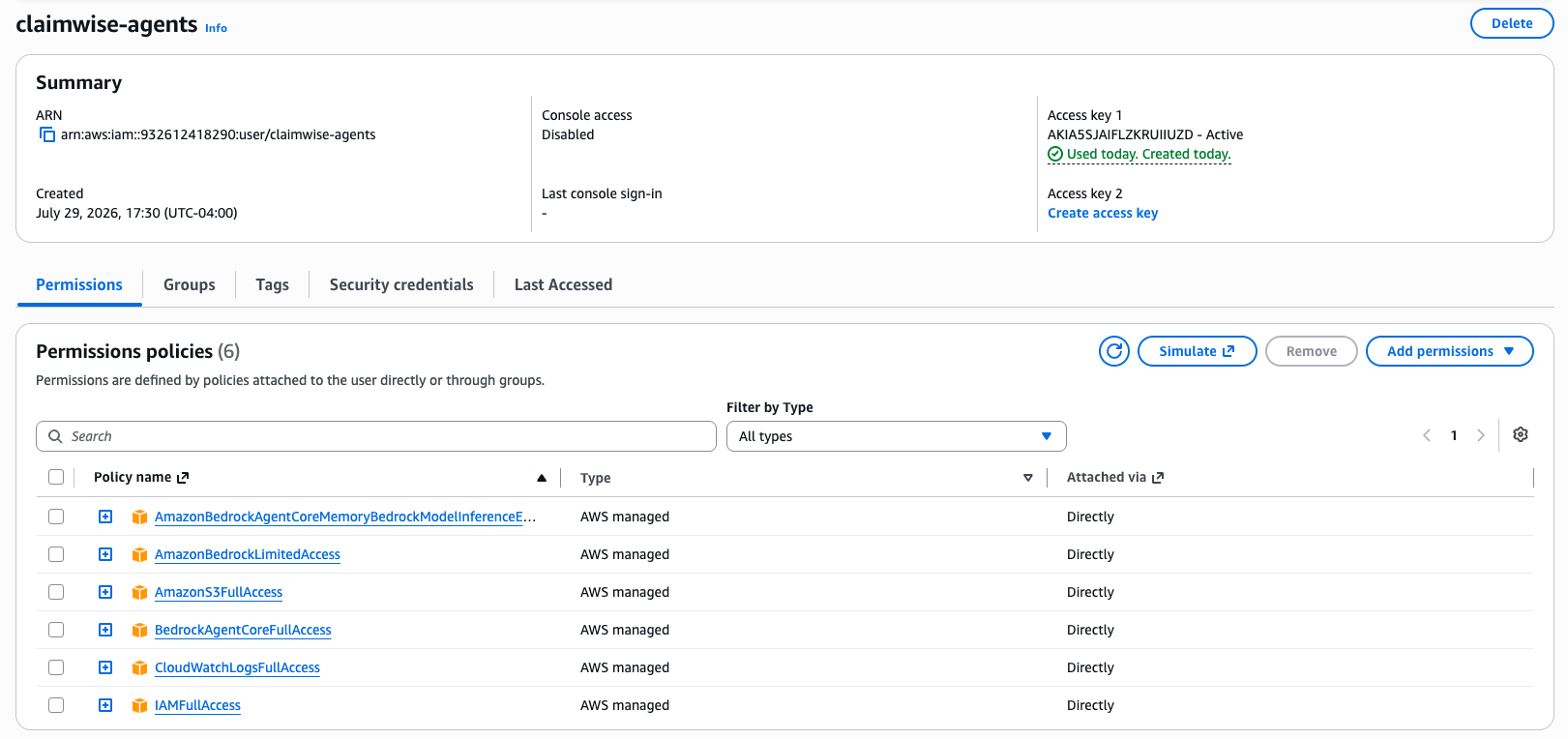
Pass 1 — CloudWatchLogsFullAccess. The first deploy's own log
group creation and the CloudWatch Logs Delivery API (PutDeliverySource,
which sets up the pipeline that carries Runtime traces out) were both
denied — the user had no logs:* permissions at all yet.
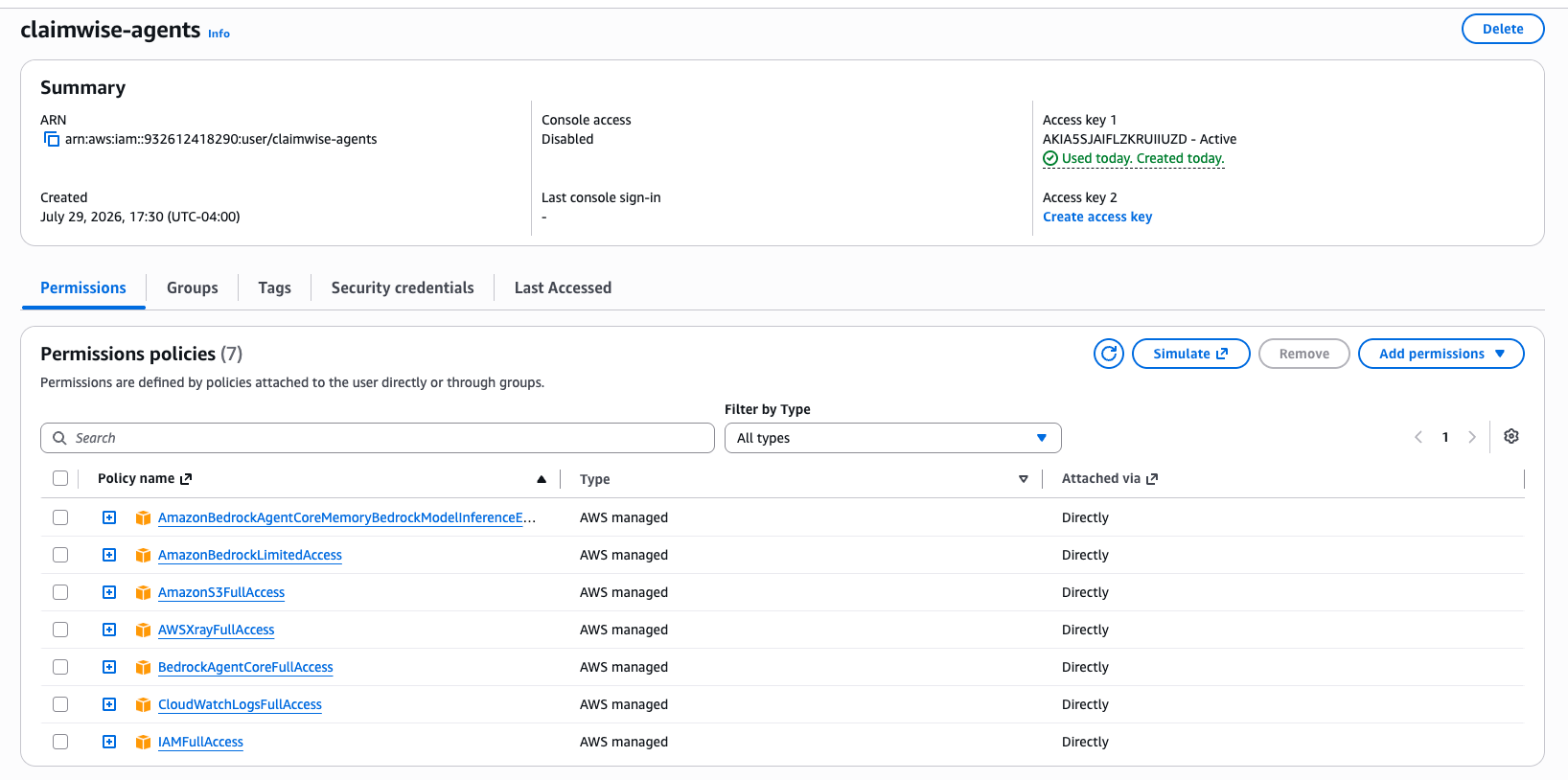
Pass 2 — AWSXRayFullAccess. Redeploying with CloudWatchLogsFullAccess
attached got further — the delivery source and destination both got
created — but the deploy still failed at the last step: AccessDeniedException:
Access Denied for this Delivery Destination. The actual cause: AWS
auto-creates the resource policy that lets a Delivery Destination receive
traces only when the caller also has xray:PutResourcePolicy and
xray:ListResourcePolicies — permissions BedrockAgentCoreFullAccess
does not include (it only grants read-oriented X-Ray actions). Attaching
AWSXRayFullAccess fixed it.
Redeploying after Pass 2 logged Observability enabled for
runtime/claimwise_supervisor-lmETE5GGLM - logs: True, traces: True —
both the GenAI Observability Dashboard (CloudWatch/X-Ray) and this
project's own LangSmith/Arize AX/OTLP tracing (see
Operations) are now live on the cloud Runtime,
not just locally.
Docker, AWS Lambda, Kubernetes: not part of this project's deployment story — AgentCore Runtime is the only cloud target designed for.
Upgrading
What to run when something changes, by what changed:
| What changed | How to upgrade |
|---|---|
| Agent code or prompts | Re-run the full agentcore deploy command above — it updates in place, same ARN, no client changes. Pass the complete --env set every time: env vars do not persist between deploys (forgetting them is exactly the crash in the Runbook). |
| Model | Change --env BEDROCK_MODEL_ID=... and redeploy. Nothing else references the model id. |
| Python dependencies | uv sync locally, run make smoke && make eval, then redeploy. Mind the numpy<2.5 pin — AgentCore's arm64 cross-compile refuses to build from source (Runbook). |
| chat-adapter | Push to main touching chat-adapter/** — CI publishes the new image. Then docker compose pull && docker compose up -d wherever the stack runs. |
| Chat widget | Bump the pinned sha-* tag on the chat-client image in docker-compose.yml. |
Verify any agent redeploy the same way every time: agentcore status,
one agentcore invoke smoke question, and — if it fails — CloudWatch
logs first, because agentcore invoke reports startup crashes as
generic timeouts (Operations).
Each successful deploy rewrites the gitignored .bedrock_agentcore.yaml
with the account-specific state (ARNs, memory id, session id) —
bedrock_agentcore.sample.yaml
shows its shape without the real values.
Integration Methods
Which method to reach for — every one has a full runnable example in Examples:
| Method | When to use it |
|---|---|
CLI (make run) |
Interactive local testing, one specialist or the full crew |
REST (/invocations) |
Calling from anything that speaks HTTP, or once deployed to AgentCore Runtime |
Browser chat widget (make chat) |
Conversing with the deployed agent from a web UI — see below and Chat Channel |
| Python SDK | Embedding an agent directly in another Python process |
| MCP | Planned — needs a Lambda-packaging step first, see below |
| Event Driven (SQS/SNS/EventBridge/Kafka) | Not applicable — this project has no queue or event-bus trigger |
| Agent-to-Agent | Already how the Supervisor calls its four specialists internally — see Architecture |
Browser chat widget
A browser can't call the cloud Runtime directly — InvokeAgentRuntime
needs SigV4-signed requests, and AWS credentials never belong in a
browser. chat-adapter/
is a small FastAPI bridge that translates the
mcp-chat-client
widget's REST/SSE contract into signed InvokeAgentRuntime calls, and
the root docker-compose.yml runs both for testing:
# needs AGENT_RUNTIME_ARN in .env (the agent_arn from .bedrock_agentcore.yaml)
make chat        # = docker compose up (both images pulled from GHCR)
open http://localhost:3000
Multi-turn works because the widget resends its transcript every turn and the adapter folds it into the prompt — no AgentCore Memory needed. Details in chat-adapter/README.md.
The adapter is also published as a public multi-arch image by
publish-chat-adapter.yml
on every push to main that touches chat-adapter/, so it runs anywhere
without a checkout:
docker run --rm -p 8006:8006 \
  -e AGENT_RUNTIME_ARN=arn:aws:bedrock-agentcore:us-east-2:...:runtime/claimwise_supervisor-... \
  -e AWS_REGION=us-east-2 \
  -v ~/.aws:/root/.aws:ro \
  ghcr.io/senthilsweb/claimwise-chat-adapter:latest
MCP
Planned. Exposing the tools (query_metric, get_claim_story, etc.) as
MCP Gateway targets needs a Lambda-packaging step first — MCP Gateway
targets are lambda | openApiSchema | mcpServer | smithyModel, not a
bare Python function. The concrete steps are recorded in the
task register.
What next
- Every runnable example, with real output → Examples
- Tracing every call you make → Operations